
Overview
TPP now allows clients to securely capture and store a customer’s card information directly through the Payment Portal. This feature makes it easier to collect payment information in advance and keep it securely associated with the appropriate client record.
The steps below will walk you through how to capture a client’s card information using the Payment Portal.
Note: TPP Pay must be active on the account in order to use this feature
Step 1
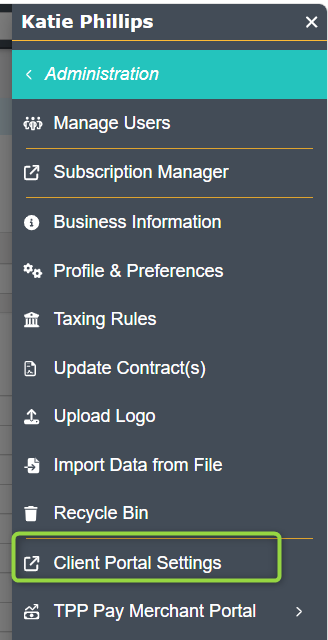
Go into TPP and select the Profile Menu > Administration > Client Portal Settings
Step 2
Under Client Portal Settings, Select Portal Sections > Save Card > Save
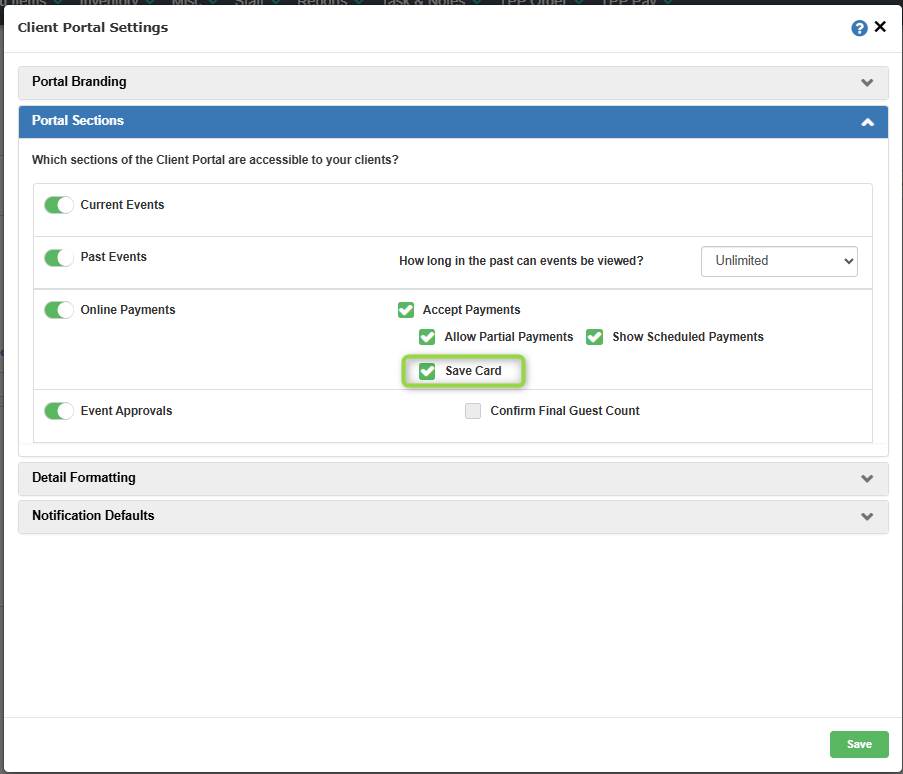
Turning this setting on will activate the ability to capture and store the Client’s payment information when they make a payment via the Payment Portal.
What the Client Sees
Now in the Payment Portal, Clients will see a disclaimer when submitting their payment information.

Where is the collected information stored?
All payment methods for individual clients are stored under their Client Profile in TPPsales > Accounts > Contacts under the Credit Cards field
Note: payment method information is hidden except for the last four of the number to differentiate which method is being processed – payment methods cannot be edited within TPP and will need to be deleted and readded if new information is needed.